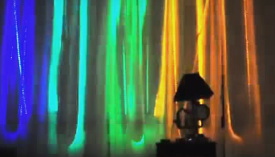
 I went to a show at a local coffee shop and during the show, I realized their music would be great with a Color Organ. After the show I talked to the shop owner about it, and he was thrilled with the idea. My Color Organ is based on the Arduino Processor, and the SparkFun Audio Spectrum Shield which uses the MSGEQ7 Graphic Equalizer IC. In this post, I will describe how to build an Arduino Color Organ.
Here is a video of my Color Organ set up in my living room.
I am using the 6 PWM outputs of the Arduino to drive a SparkFun Power MosFet shield, which then drives 6 LED strips proportional to the audio level in each of the 6 audio regions. The audio is picked up with a SparkFun Electret Microphone
and then fed into the Spectrum shield. The MSGEQ7 IC on the shield does the audio sampling which is then fed into the Arduino.
I found some LED strips that are 16 ft. long so I bought 6 of them. Each LED strip draws approximately 2 amps each, so directly using the Arduino 6 PWM outputs was out of the question, I decided to use the SparkFun MosFet power driver shield to drive the LED strips.
Additionally, my power supply needs to handle at least 12 amps at 12 volts. For this, I used an old ATX computer power supply I had laying around. However you can’t just use a computer power supply straight away, you have to do a bit of hacking of it to get it to work outside of a computer. Not to worry, here are some directions for hacking a computer power supply.
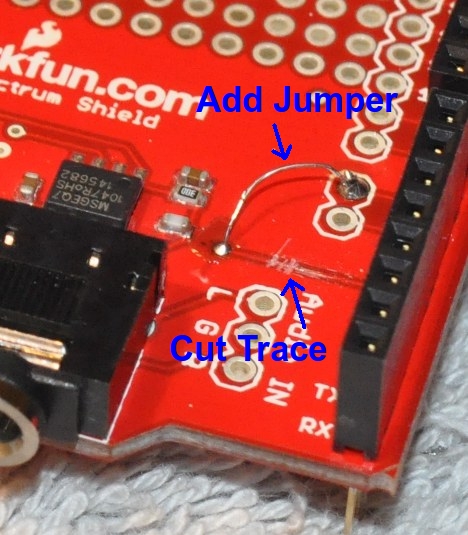
One thing about the SparkFun Spectrum shield that I wish had been done differently is that they used one of the Arduino’s PWM outputs to reset the MSGEQ7 IC. This seems like a waste of a PWM output to me as they could have just as easily used a non-PWM output, such as Digital Out #7. Since I was going to use the MosFet Power Driver, which has 6 channels, I decided to modify the Spectrum Shield to use output D7. Its not a huge deal, I just cut the trace to the MSGEQ7 and jumpered it over to the D7 output. Doing this modification now gives me 6 PWM outputs instead of 5 for the LED strips.
Here is a photo of the modified Spectrum shield:
Thanks!!
Welcome!